
Listeners
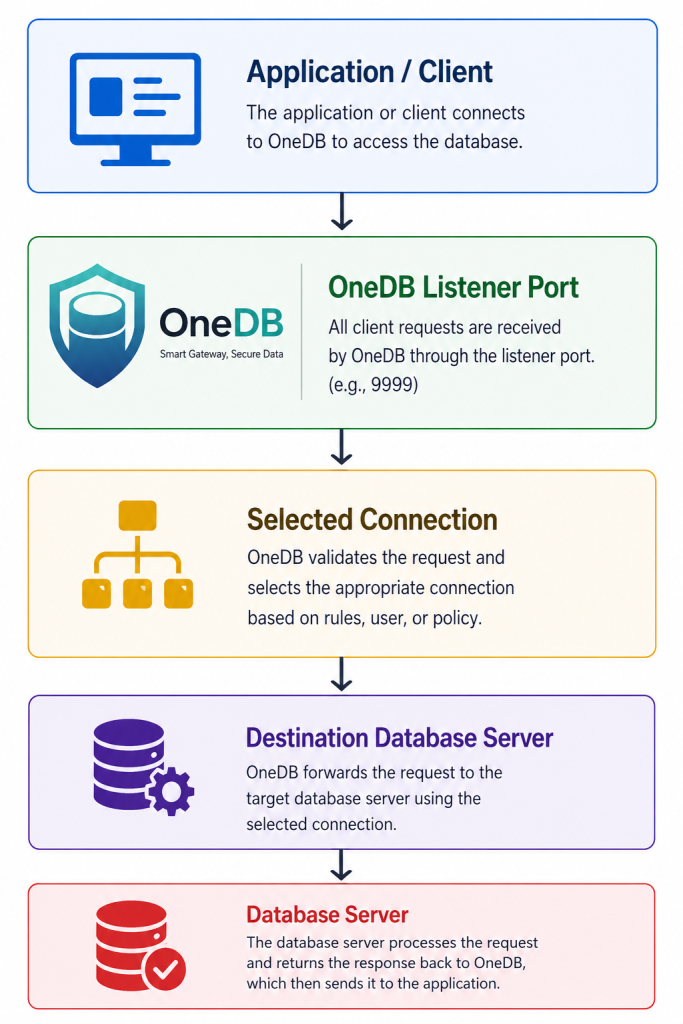
The Listeners menu is used to configure and manage OneDB listener services. A listener acts as the access point between client applications and the configured database connection.
Each listener defines the port exposed by OneDB, its primary database connection, allowed connection profiles, listener status, maximum allowed connections, and idle timeout behavior.
A listener can support multiple registered OneDB connection profiles when they use the same database type and backend database endpoint. This allows client users or applications to connect through one listener while OneDB applies the appropriate connection profile, database scope, and security policies.
Listeners Management
To access this page, go to:
Database Server > ListenersThe Listeners Management page displays all configured listeners in OneDB.
Each listener is shown in a table with the following information:
| Column | Description |
|---|---|
| Listener Name | The name of the listener configuration. |
| Port | The port exposed by OneDB for client application connections. |
| Connection | The database connection associated with the listener. |
| IP Destination | The destination IP address of the target database server. |
| Port Destination | The destination port of the target database server. |
| Status | The current status of the listener, such as ENABLED or DISABLED. |
| Action | Provides options to edit or delete the listener configuration. |
Add Listener
To create a new listener, click the Add listeners button from the Listeners Management page.
The Add Listener form will be displayed.
Listener Configuration Fields
Fill in the required listener configuration details.
| Field | Description |
|---|---|
| Listener Name | Defines the name of the listener. Use a clear and descriptive name, such as mysql-local-gateway or pg-local-gateway. |
| Connections | Selects the primary database connection for the listener. The selected connection becomes the listener runtime connection and policy boundary. |
| Allowed Databases / Schemas | Selects additional registered OneDB connection profiles that are permitted through this listener. Only compatible profiles using the same database type and backend endpoint can be added. |
| Port | Defines the OneDB listener port that client applications will connect to. |
| Listener Status | Enables or disables the listener without deleting the configuration. |
| Secure Connection | Enables SSL/TLS for client connections to this listener. |
| Max Connections | Defines the maximum number of concurrent client connections allowed for this listener. |
| Idle Timeout (Seconds) | Defines how long an idle connection can remain open before it is automatically closed. |
Connection Profiles
The Connections field is used to select the primary database connection for the listener.
This primary connection establishes the listener runtime configuration and policy boundary. It defines the database type, backend destination, and the base security context used by the listener.
The Allowed Databases / Schemas field allows additional compatible OneDB connection profiles to be assigned to the same listener.
Only registered OneDB connections that meet the following requirements are available:
- Use the same database type as the primary connection.
- Use the same backend database host or IP address.
- Use the same backend database port.
For example, a PostgreSQL listener can allow multiple PostgreSQL connection profiles for different databases, schemas, or database users, as long as they point to the same PostgreSQL backend server.
Queries to databases or schemas that are not included in the allowed connection profiles will be blocked by the listener.
The primary connection must always be selected before additional connection profiles can be assigned.
Port Configuration
The Port field defines the port exposed by OneDB.
Client applications will connect to OneDB using this port instead of connecting directly to the database server.
Valid port range:
1024 - 65535Example:
| Listener Name | OneDB Listener Port | Target Database Port |
|---|---|---|
| mysql-local-gateway | 1950 | 3307 |
| pg-local-gateway | 1948 | 5433 |
| oracle-cloud | 1946 | 1522 |
| mssql-cloud-gateway | 1945 | 1432 |
Listener Status
The Listener Status field controls whether the listener is active.
| Status | Description |
|---|---|
| Enabled | The listener is active and can accept client connections. |
| Disabled | The listener configuration is saved but does not accept client connections. |
This option is useful when the administrator wants to temporarily disable access without deleting the listener configuration.
Max Connections
The Max Connections field defines the maximum number of concurrent client connections allowed for the listener.
Default value shown:
10Valid range:
1 - 1000Use this setting to control connection capacity and prevent excessive client connections from reaching the target database through OneDB.
Idle Timeout
The Idle Timeout (Seconds) field defines how long an idle client connection can remain open.
Default value shown:
60Valid range:
10 - 3600 secondsIf a connection remains idle longer than the configured timeout value, OneDB will automatically close the connection.
Submit Listener Configuration
After all required fields have been completed, click Submit to save the listener configuration.
Once saved, the listener will appear in the Listeners Management table.
Allowed Connection Profiles
After a listener has been configured, administrators can view its allowed connection profiles from the Listeners Management page.
The profile list displays the connection details associated with the listener, including:
| Information | Description |
|---|---|
| Connection ID | Unique identifier of the registered OneDB connection profile. |
| Connection Name | Name assigned to the connection profile. |
| Database Type | Database platform used by the profile, such as PostgreSQL, MySQL, Oracle, or Microsoft SQL Server. |
| Database / Schema | Database or schema scope configured for the profile. |
| Username | Database username associated with the profile. |
| Host / IP | Backend database server host or IP address. |
| Port | Backend database server port. |
| Secure Connection | Indicates whether the backend connection uses a secure connection. |
This view helps administrators confirm which connection profiles are available through a listener and verify that each profile points to the expected backend database environment.
Edit Listener
To modify an existing listener, click the Edit icon from the listener row.
The administrator can update the listener configuration, such as:
| Configuration | Description |
|---|---|
| Listener Name | Rename the listener. |
| Primary Connection | Change the primary database connection used as the listener runtime connection and policy boundary. |
| Allowed Databases / Schemas | Add or remove compatible connection profiles permitted through the listener. |
| Port | Update the OneDB listener port. |
| Listener Status | Enable or disable the listener. |
| Max Connections | Adjust the maximum concurrent connections. |
| Idle Timeout | Adjust the idle timeout duration. |
Delete Listener
To remove a listener, click the Delete icon from the listener row.
Deleting a listener removes the configuration from OneDB. After deletion, client applications will no longer be able to connect through that listener port.
Make sure the listener is no longer used by any application before deleting it.
Notes
- Each listener should use a unique port.
- The selected port must not conflict with another listener or any service already running on the OneDB server
- A listener should be associated with a valid database connection before it can be used by client applications.
- The target database IP address and destination port are inherited from the selected connection configuration
- A listener can support multiple connection profiles, provided that all selected profiles use the same database type and backend database endpoint.
- The primary connection determines the listener runtime connection and policy boundary
- Only databases or schemas included in the allowed connection profiles can be accessed through the listener.
- Requests targeting an unlisted database or schema are blocked by OneDB
- Each listener should use a unique port and must not conflict with another OneDB listener or service running on the same server
